
AI Workflow Automation for Small Business: Practical Guide to Tools & Scalable Operations

Running a growing company often feels like fighting an unending battle against manual administrative friction. Between juggling customer support tickets, qualifying incoming leads, entering data into multiple systems, and sending routine client updates, many small business owners spend over 15 to 20 hours each week bogged down by tedious administrative tasks. When every hour is spent maintaining operations rather than driving growth, the entire business suffers from operational bottlenecks and growth plateaus.
Fortunately, the landscape of small business automation has undergone a seismic shift. In 2026, ai-powered automation is no longer an exclusive luxury reserved for enterprise tech giants with massive software engineering budgets. Today, modern no-code automation tools, ai assistants, and autonomous ai agents empower solo entrepreneurs, service agencies, local stores, and growing startups to deploy high-leverage automated workflows in days rather than months.
In this guide, you will learn what ai workflow automation is, how ai and automation differ from traditional automation, the best ai tools for small businesses, and a step-by-step framework to implement automation seamlessly so your business grows sustainably.
What Is AI Workflow Automation and Why Small Businesses Need It
At its core, a business process consists of a sequence of steps required to achieve an operational goal—such as onboarding a client, generating an invoice, or routing a customer inquiry. Business automation refers to using software to execute these processes automatically without human manual intervention.
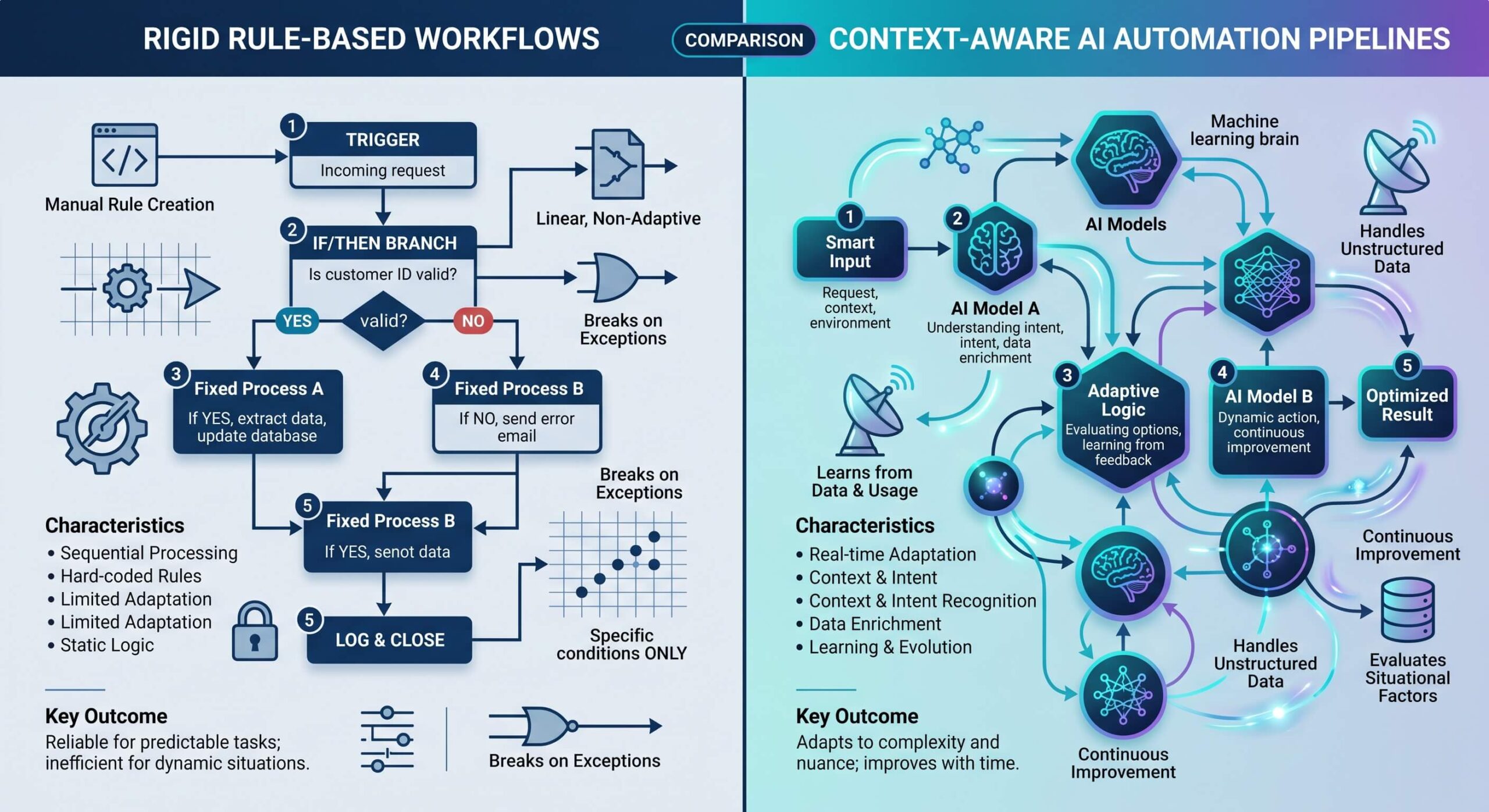
To understand why automation changes how modern teams operate, it helps to distinguish between rule-based automation and cognitive AI capabilities:
- Traditional Automation: Relies strictly on static rules and rigid triggers (e.g., “If a contact submits Form A, add a row to Google Sheets”). While useful for structured data transfers, traditional automation carries significant fragility—if the input format shifts, the workflow breaks, and it cannot understand context, messy PDFs, or natural human language.
- AI Workflow Automation: Injects cognitive reasoning and artificial intelligence into standard pipelines. With intelligent language models and vision systems, ai can read inbound customer inquiries, understand search intent, analyze sentiment, extract key details from attachments, and make contextual decisions. Furthermore, ai can draft hyper-personalized email replies, summarize meetings, and route complex requests to the right team member.

When you combine connective integration platforms with cognitive AI models, automation offers small business teams the execution leverage of a dedicated operations staff without inflating payroll overhead. Automation improves client response times from hours to seconds, eliminates manual data entry mistakes, and ensures that every workflow runs consistently 24/7.
The End-to-End AI Automation Architecture
Before deploying tools, it is crucial to understand the four-layer architecture that powers modern business automations:

As illustrated in the architecture diagram above, a successful setup links your entry triggers (forms, emails, transactions) to an intelligent LLM processing layer, coordinates logic through an integration hub (like Zapier, Make, or n8n), and executes actions directly in your destination databases and customer channels.
High-Impact AI Workflow Automation Examples for Small Business Operations
When starting an ai journey, the most successful approach is not to overhaul your entire company overnight. Instead, start small by focusing on high-volume, repetitive tasks where human fatigue creates errors or slows down client responsiveness. Here are the top workflow automation examples where automation takes repetitive tasks off your plate:
1. Smart Lead Capture and CRM Automation
Lead conversion drops drastically if inquiries are not answered within 5 to 10 minutes. By integrating crm automation with an intelligent ai tool:
- An incoming inquiry from your website or landing page triggers a webhook.
- An AI agent instantly analyzes the client’s project description, budget, and urgency.
- The automation platform qualifies the lead, updates your crm records with enriched business data, and generates a personalized follow-up email.
- If the lead qualifies for immediate discovery, the workflow automatically generates a scheduling link via calendar integration.
2. 24/7 Intelligent Customer Support and Service Automation
Customer service delays frustrate prospective buyers. Deploying an autonomous ai chatbot trained on your company knowledge base, documentation, and pricing allows your service automation to resolve 70%+ of standard inquiries immediately. For complex inquiries requiring human intervention, the bot summarizes the conversation history and escalates the ticket directly to your support inbox.
3. Automated Invoicing, Financial Admin, and Billing
Reconciling receipts, generating monthly client invoices, and tracking overdue balances consume hours of manual accounting time. With ai workflow automation, an AI model parses line items from vendor invoices, cross-references purchase orders, logs records in QuickBooks or Xero, and drafts reminder notices for unpaid invoices automatically.
4. Content Creation and Marketing Automation
Maintaining an active online presence across email newsletters, social media channels, and search engines requires continuous output. In modern marketing automation, ai can generate first-draft social posts, craft email marketing sequences, and format transcripts from recorded webinars into structured articles, allowing marketing managers to review and publish in minutes.
The Best AI Tools for Small Business Automation in 2026
Selecting the right automation tools prevents software bloat and ensures long-term operational stability. The best tools for small businesses generally combine connective platforms with specialized AI modules:
| Automation Tool | Category / Type | Best For | Key AI Capabilities |
|---|---|---|---|
| Zapier Central & Zaps | No-Code Integration | Beginner to Intermediate SMBs | Native OpenAI / Anthropic actions, AI Copilot, 6,000+ app connectors |
| Make.com | Visual Workflow Builder | Complex multi-branch routing | Visual data mapping, custom webhooks, nested AI parsing functions |
| n8n | Self-Hosted / Cloud Automation | Privacy-conscious & technical teams | Built-in LangChain nodes, native ai agents, vector store connections |
| HubSpot / ActiveCampaign | AI-Powered CRM | Sales & Lead Management | Predictive lead scoring, email drafting, automated follow-up cadences |
| OpenAI API / Claude API | Foundation AI Engine | Custom cognitive processing | Structured JSON extraction, vision parsing, document reasoning |
By connecting tools like zapier or Make to your core business tools, you create unified communication pipelines between disjointed applications. Automation makes it simple to capture data from Webhooks, pass it to an LLM for formatting, and write the output back to your database seamlessly.
How to Implement AI Workflow Automation: A Step-by-Step Blueprint
Achieving successful automation requires following a disciplined, structured rollout plan. When small businesses face automation failures, it is rarely due to software limitations—rather, it stems from attempting to automate broken or undefined processes. Follow these four steps to build ai systems that scale:
Step 1: Audit and Map Your Operational Bottlenecks
Begin by conducting an internal operations audit. For one week, have your team log every recurring task that takes more than 15 minutes. Categorize tasks by frequency, technical complexity, and business impact. Identify manual steps that involve copying data between multiple systems or drafting repetitive messages.
Step 2: Start with One High-ROI Workflow
Rather than trying to automate your entire business in a single sprint, choose one workflow with clear inputs and outputs. Ideal starter candidates include new lead notifications, automated invoice filing, or meeting recap distribution. Building a fast win validates ROI and builds internal team enthusiasm for ai automation.
Step 3: Connect Your Tools and Integrate Cognitive AI Nodes
Using a visual automation platform like Make or Zapier, connect your trigger application (such as a WordPress contact form, Typeform, or Stripe payment webhook) to your action apps. Insert an AI prompt step that instructs the model with clear system rules, desired response formats, and strict boundary constraints.
Step 4: Maintain Human-in-the-Loop Oversight
During the initial rollout phase, configure your automated workflows to send draft actions to a review queue (such as a private Slack channel or draft email folder) before firing outward. Once you verify that the ai systems perform reliably with 99%+ accuracy, you can enable fully autonomous execution.
Common Pitfalls and How Small Business Owners Can Avoid Them
As you scale your automation capabilities, keep these foundational best practices in mind:
- Avoid Automating Flawed Processes: Automating a broken or confusing business process only generates chaotic errors faster. Refine and standardize your manual steps first before translating them into automated triggers.
- Prevent Data Silos: Ensure all automated triggers sync back to a central system of record (like your primary CRM or database) so customer context remains cohesive.
- Protect Sensitive Customer Data: Never send unmasked personally identifiable information (PII) or confidential credentials through unvetted third-party endpoints. Implement proper data privacy filters and use enterprise-grade API keys.
- Continuously Monitor Performance: Set up automated error-alert notifications in Slack or email so you are alerted instantly if a webhook endpoint changes or an API connection expires.
Frequently Asked Questions (FAQ)
Can I implement AI workflow automation without coding skills?
Yes. Modern no-code automation tools such as Zapier, Make, and Activepieces feature visual drag-and-drop builders and pre-built templates, enabling non-technical founders to launch robust automations in hours.
How much does AI automation cost for a small business?
Starting with lightweight automation is remarkably cost-effective. Starter tiers for platforms like Zapier or Make range between $20 and $50 per month, while LLM API costs for text processing typically total only a few dollars per month for thousands of executions.
Which workflows should small businesses automate first?
The highest immediate return comes from lead response workflows, appointment scheduling, invoice generation, customer support triage, and social media content repurposing.
Conclusion: Transform Your Small Business Operations Today
In 2026 and beyond, ai workflow automation for small business is no longer just about saving a few minutes—it is about unlocking competitive agility, elevating customer experience, and scaling revenue without ballooning overhead. By embracing the right automation strategies, every small business owner can delegate repetitive administrative burden to intelligent systems and focus energy where it matters most: strategic innovation, high-value client relationships, and business growth.